2013年4月15日 星期一

[c][cpp] Guide to Network Programming

[c][cpp] Guide to Network Programming

What is a socket?

  • a way to speak to other programs using standard Unix file descriptors.
  • “If it's a file descriptor, why in the name of Neptune can't I just use the normal read() and write() calls to communicate through the socket?” The short answer is, “You can!” The longer answer is, “You can, but send() and recv() offer much greater control over your data transmission.”

Two Types of Internet Sockets

  • One is “Stream Sockets”; the other is “Datagram Sockets”.
  1. Stream sockets are reliable two-way connected communication streams. If you output two items into the socket in the order “1, 2”, they will arrive in the order “1, 2” at the opposite end. They will also be error-free. Stream sockets use a protocol called “Transmission Control Protocol”, otherwise known as “TCP” (see RFC 7936 for extremely detailed info on TCP.) TCP makes sure your data arrives sequentially and error-free.
  2. Datagram sockets? Why are they called connectionless? What is the deal, here, anyway? Why are they unreliable? Well, here are some facts: if you send a datagram, it may arrive. It may arrive out of order. If it arrives, the data within the packet will be error-free. They use the “User Datagram Protocol”, “UDP” (see RFC 7688.) don't have to maintain an open connection as you do with stream sockets. You just build a packet, slap an IP header on it with destination information, and send it out. No connection needed. Example : tftp and similar programs have their own protocol on top of UDP. The tftp protocol says that for each packet that gets sent, the recipient has to send back a packet that says, “I got it!” (an “ACK” packet.) If the sender of the original packet gets no reply in, say, five seconds, he'll re-transmit the packet until he finally gets an ACK. This acknowledgment procedure is very important when implementing reliable SOCK_DGRAM applications. Why would you use an unreliable underlying protocol? Two reasons: speed and speed.

Data Encapsulation


  • Basically, it says this: a packet is born, the packet is wrapped ("encapsulated") in a header (and rarely afooter) by the first protocol (say, the TFTP protocol), then the whole thing (TFTP header included) is encapsulated again by the next protocol (say, UDP), then again by the next (IP), then again by the final protocol on the hardware (physical) layer (say, Ethernet).
  • When another computer receives the packet, the hardware strips the Ethernet header, the kernel strips the IP and UDP headers, the TFTP program strips the TFTP header, and it finally has the data.


Byte Order

  • The thing is, everyone in the Internet world has generally agreed that if you want to represent the two-byte hex number, say b34f, you'll store it in two sequential bytes b3 followed by 4f. Makes sense, and, as Wilford Brimley would tell you, it's the Right Thing To Do. This number, stored with the big end first, is called Big-EndianThe more-sane Big-Endian is also called Network Byte Order because that's the order us network types like.While the Host Byte Order isn't right, and you always run the value through  function to set it to Network Byte Order.
  • Conversion Functions : 
    htons()host to network short
    htonl()host to network long
    ntohs()network to host short
    ntohl()network to host long


Ref :
http://beej.us/guide/bgnet/output/html/singlepage/bgnet.html
http://techpubs.sgi.com/library/dynaweb_docs/0530/SGI_Developer/books/IRIX_NetPG/sgi_html/ch04.html
http://mi.nou.edu.tw/yen/Ch8-ok.pdf
http://content.edu.tw/primary/info_edu/cy_sa/report/more/8611a8.htm

2013年4月12日 星期五

[eclipse][c] Eclipse console does not show output on Windows

[eclipse][c] Eclipse console does not show output on Windows

In Eclipse CDT on Windows, standard output of the program being run or debugged is fully buffered, because it is not connected to a Windwos console, but to a pipe. See bug 173732 for more details. Either add fflush calls after every printf or add the following lines in the start of the main function:
setvbuf(stdout, NULL, _IONBF, 0);
setvbuf(stderr, NULL, _IONBF, 0);

Ref :
http://wiki.eclipse.org/CDT/User/FAQ#Eclipse_console_does_not_show_output_on_Windows

2013年4月10日 星期三

[eclipse][c][cpp] Eclipse C&Cpp Development

[eclipse][c][cpp] Eclipse C&Cpp Development

1.Download and Decompress Eclipse IDE for C/C++ Developers
2.Download and Install MinGW
  • Directory : C:\MinGW
  • Environment Variable [PATH] : PATH=C:\MinGW\bin
  • Renaming C:\MinGW\bin\mingw32-make.exe to C:\MinGW\bin\make.exe

3.Installing Eclipse Plugin : C/C++ Development tool CDT
  • Go to Help ‣ Install New Software
  • Add CDT to Available Software Sites
  • Select the main CDT Plugin for installation : CDT Main Features

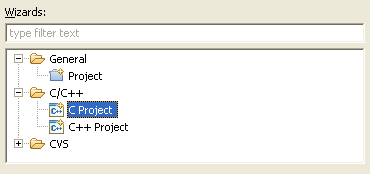
4.Click File ‣ New ‣ Project
5.Select C Project
../../../_images/e-wiz-new-prj-sel-c.png
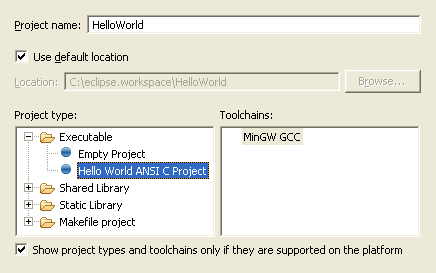
6.Name the project as Hello World
7.Select project type as Hello World ANSI C Project
8.Select Tool-chain as MinGW GCC
Select an empty Hello world ANSI C Project
9.Click Next button
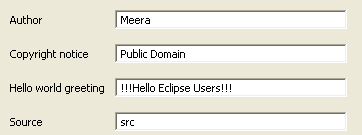
10.Input your details
Input your details
11.Click Next button
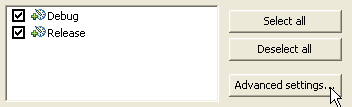
12.Select Advanced settings
Go to Advanced Settings
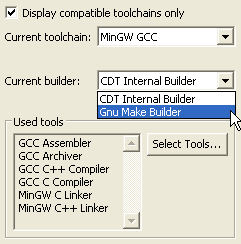
13.Select Current bulder as Gnu Make Builder
Select GNU Make builder in advanced settings of Eclipse
14.Click OK button
15.Click Finish button
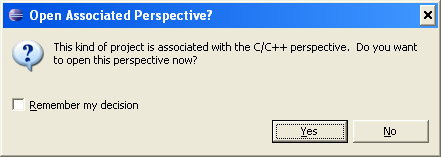
16.If you get a message to switch perspective, Click Yes 
Accept the request to change the perspective.
This happens if the previous perspective was not C/C++ perspective.
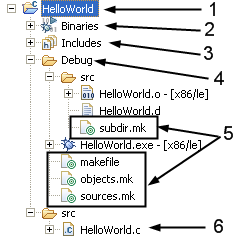
This is how the Project Explorer view would look like.
A sample view of the Project Explorer of Eclipse
1.The name of the project HelloWorld
2.Eclipse would list executables and libraries of the project here.
3.Eclipse would list include directories and header files here.
4.Eclipse generated folder. The name is derived from the build configuration.
5.Eclipse generated Makefiles
6.The actual source file.
To build the project, do either of:
  • Press Ctrl + B
  • Click Project ‣ Build All
  • Press the Build Button


Ref :
http://eclipsebook.in/advanced-eclipse/extending-eclipse/installing-cdt/
http://eclipsebook.in/c-cpp-development/building-code/build-eclipse-managed/

2013年4月2日 星期二

[java] Controlling Access to Members of a Class

[java] Controlling Access to Members of a Class

Modifier         Class            Package      Subclass      World         
public
Y
Y
Y
Y
protected
Y
Y
Y
N
no modifier
Y
Y
N
N
private
Y
N
N
N


Ref :
http://docs.oracle.com/javase/tutorial/java/javaOO/accesscontrol.html

2013年4月1日 星期一

[synchronized][java] Java Concurrency Read/Write Locks

[synchronized][java] Java Concurrency Read/Write Locks


A read / write lock is more sophisticated lock than the Lock implementations shown in the text Locks in Java. Imagine you have an application that reads and writes some resource, but writing it is not done as much as reading it is. Two threads reading the same resource does not cause problems for each other, so multiple threads that want to read the resource are granted access at the same time, overlapping. But, if a single thread wants to write to the resource, no other reads nor writes must be in progress at the same time. To solve this problem of allowing multiple readers but only one writer, you will need a read / write lock.
Java 5 comes with read / write lock implementations in the java.util.concurrent package. Even so, it may still be useful to know the theory behind their implementation

Read / Write Lock Java Implementation
First let's summarize the conditions for getting read and write access to the resource:
Read Access If no threads are writing, and no threads have requested write access.
Write Access If no threads are reading or writing.
If a thread wants to read the resource, it is okay as long as no threads are writing to it, and no threads have requested write access to the resource. By up-prioritizing write-access requests we assume that write requests are more important than read-requests. Besides, if reads are what happens most often, and we did not up-prioritize writes, starvation could occur. Threads requesting write access would be blocked until all readers had unlocked the ReadWriteLock. If new threads were constantly granted read access the thread waiting for write access would remain blocked indefinately, resulting in starvation. Therefore a thread can only be granted read access if no thread has currently locked the ReadWriteLock for writing, or requested it locked for writing.
A thread that wants write access to the resource can be granted so when no threads are reading nor writing to the resource. It doesn't matter how many threads have requested write access or in what sequence, unless you want to guarantee fairness between threads requesting write access.

With these simple rules in mind we can implement a ReadWriteLock as shown below:
1
2
3
4
5
6
7
8
9
10
11
12
13
14
15
16
17
18
19
20
21
22
23
24
25
26
27
28
29
30
31
32
33
public class ReadWriteLock{
 
  private int readers       = 0;
  private int writers       = 0;
  private int writeRequests = 0;
 
  public synchronized void lockRead() throws InterruptedException{
    while(writers > 0 || writeRequests > 0){
      wait();
    }
    readers++;
  }
 
  public synchronized void unlockRead(){
    readers--;
    notifyAll();
  }
 
  public synchronized void lockWrite() throws InterruptedException{
    writeRequests++;
 
    while(readers > 0 || writers > 0){
      wait();
    }
    writeRequests--;
    writers++;
  }
 
  public synchronized void unlockWrite() throws InterruptedException{
    writers--;
    notifyAll();
  }
}
The ReadWriteLock has two lock methods and two unlock methods. One lock and unlock method for read access and one lock and unlock for write access.


The rules for read access are implemented in the lockRead() method. All threads get read access unless there is a thread with write access, or one or more threads have requested write access.

The rules for write access are implemented in the lockWrite() method. A thread that wants write access starts out by requesting write access (writeRequests++). Then it will check if it can actually get write access. A thread can get write access if there are no threads with read access to the resource, and no threads with write access to the resource. How many threads have requested write access doesn't matter.

It is worth noting that both unlockRead() and unlockWrite() calls notifyAll() rather than notify(). To explain why that is, imagine the following situation:

Inside the ReadWriteLock there are threads waiting for read access, and threads waiting for write access. If a thread awakened by notify() was a read access thread, it would be put back to waiting because there are threads waiting for write access. However, none of the threads awaiting write access are awakened, so nothing more happens. No threads gain neither read nor write access. By calling noftifyAll() all waiting threads are awakened and check if they can get the desired access.

Calling notifyAll() also has another advantage. If multiple threads are waiting for read access and none for write access, and unlockWrite() is called, all threads waiting for read access are granted read access at once - not one by one.

Read / Write Lock Reentrance
The ReadWriteLock class shown earlier is not reentrant. If a thread that has write access requests it again, it will block because there is already one writer - itself. Furthermore, consider this case:
Thread 1 gets read access.
Thread 2 requests write access but is blocked because there is one reader.
Thread 1 re-requests read access (re-enters the lock), but is blocked because there is a write request
In this situation the previous ReadWriteLock would lock up - a situation similar to deadlock. No threads requesting neither read nor write access would be granted so.

To make the ReadWriteLock reentrant it is necessary to make a few changes. Reentrance for readers and writers will be dealt with separately.

Ref : 
01. http://java.dzone.com/news/java-concurrency-read-write-lo?page=0,0
02. http://ilkinbalkanay.blogspot.tw/2008/01/readwritelock-example-in-java.html
03. http://www.jdon.com/34773